I was indeed referring to the famously linked response, but also expressing my astonishment that such a thing is even necessary. Not familiar with that topic at all, so pardon my ignorance.
> astonishment that such a thing is even necessary
It's necessary because there's a impedance mismatch between editing rich text and generating markup. Text editing works on text ranges while DOM manipulation works on trees. There's also behavior that you expect in an editor that isn't the default in markup like leaving empty paragraphs when you hit enter. Then there's the app-specific logic like what parts of pasted text you want to keep and what to pitch and what you want the markup to look like. Browsers also tend to toss in random <br> tags and style attributes. So that's why you want to start messing with the browser provided behavior.
If you don't go with simple markup and regexps for the fixup or you want to provide capabilities beyond what's available in the execCommand then you need to deal with the Range API.
Rant time!
The DOM 2 Range API which is far and away the worst API I've ever used in my life. You only want so many things from a Range api: the ability to select text, the ability to determine what's selected, and the ability to manipulate the selection.
For the first, you can do it but the offsets are dependent on node and offset which can be a text or child node offset and you must check the node type to distinguish between the two. This representation, naturally, does not persist when you're doing DOM manipulation. This is the best part of the API.
For the second. You can't actually get the selected DOM nodes. You can get the text using .toString(), you can extract or clone the nodes so you can mess with them in a doc fragment but you can't get at the live nodes in the DOM.
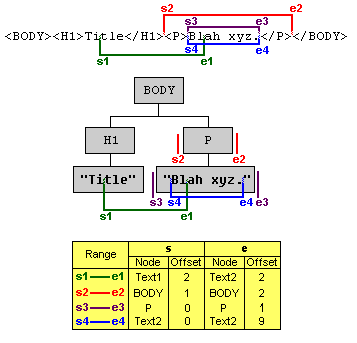
Next, determining equality of ranges–which is useful for figuring out when one range is in another so you can, say, invert the range–is tricky. See the illustration [1] in the spec. Ranges 2-4 in the illustration are, in terms of both visual appearance and text selected, equal but they do not compare as equal. It's actually possible for any permutation of the start and end points in the illustration to be what your users would consider an identical range. This illustration is simplified. In the real world, whitespace nodes in the DOM create an additional 4+ equivalent points that are identical. This isn't academic. They all happen in different permutations in different browsers depending on how the user selects text (start to end, end to start, double click, triple click, etc).
The third part, manipulation, works mainly by inserting a DOM node in front of the startContainer, extracting the selection, and then sticking it in the DOM node. Requires special handling for selections crossing block nodes due to HTML containment rules. Generates wonderful stacks of empty nodes depending on where the range is when you slice. Breaks the browser's native history stack.
So that's why writing a quality RTE in the browser is harder than you might think. There are other issues like cross-browser normalization, bugs like webkit not displaying the cursor when the cursor is in an empty element but the Range API is the big one.